
MU HELPER
Guides › MU Helper
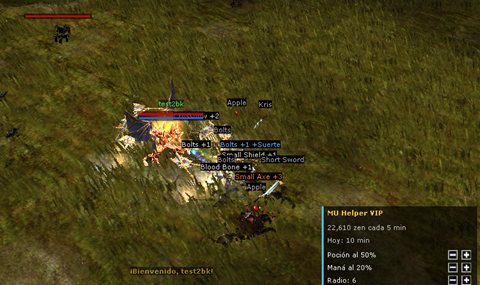
The MU Helper is the game's hunting assistant: F8 opens its window and with the Start button your character attacks nearby monsters on its own with the skill you have selected, drinks potions, picks up what you choose and goes back to its spot. It's part of the game and it's allowed (external programs are still banned). It charges zen in advance every 5 minutes. The window shows up in the language you picked in the launcher; this guide uses the English labels.
- Who can use it: everyone.
- You can use it from level 40 and outside the safe zone.
- VIP only: spare pet: equip one if none, mana: drink at the % you choose, spare pet: which ones and in what order, session. In the window they show up grayed out with a VIP tag.
How to use it
- Press F8 anywhere, even in town: the Helper window opens, paused, so you can set it up calmly (potions, range, what to pick up, spare pet). Opening it costs nothing.
- Go to a hunting area for your level (the spots work) and select the attack skill you want to fight with (mouse wheel or keys 1 to 9). With a support skill (buffs, heal, summon, teleport) it won't let you start.
- Press the green Start button in the window. The first 5 minutes are charged and your character attacks the nearest monster within the hunt range around the spot where you turned it on. If there are no monsters, it goes back to that spot.
- The orange Pause button stops it and the window stays open. If you press Start again before the 5 minutes you already paid for run out, it doesn't charge you again.
- F8 closes the window (and if it was hunting, turns it off).
Next to the button the window shows its status: Hunting, Ready or why it can't be used here (in a safe zone, in Blood Castle or Devil Square, below the minimum level or with a support skill; if you don't want it to attack, uncheck "Attack monsters" and it no longer needs an attack skill). If it paused by itself, it tells you why.
You can keep using the mouse
- Moving the mouse doesn't stop it: your cursor is yours and the Helper keeps hunting.
- You can open the inventory, the character window, the party or the map and use them with the mouse: the Helper keeps hunting.
- If you're holding an item on the cursor, typing in the chat or have an NPC, shop, vault or trade window open, the Helper waits and resumes on its own when you're done.
- If you click on the ground, the Helper gives you the mouse for a moment. If you walk somewhere else, it keeps hunting at the new spot.
It pauses by itself
When you enter a safe zone, when you change maps or location (a gate, like the ones between Lost Tower floors, a /move or a teleport, even if you don't land in a safe zone), if you die, when your inventory is full or when you can't afford the next 5 minutes. The window stays open and tells you why; to continue, go hunt and press Start. It closes when you switch characters or quit the game.
If you weren't watching, My account > My hunting sessions shows how each session ended. If you got killed, it shows who did it (the monster or the player) and on which map and tile.
It also shows the experience and damage per minute of each session, with the map and tile where you turned the Helper on, and where each character does best. Every time you press Pause the session closes, so to measure another place press Pause, walk there and press Start again.
The window
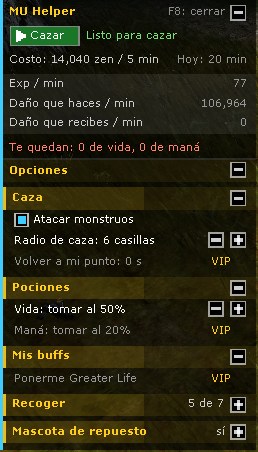
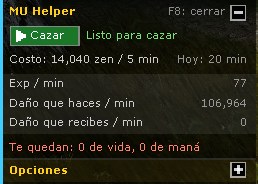
- Cost of each 5 minutes and how much you've spent today.
- Per minute (the strip at the top): how much experience you gain, how much damage you deal to monsters and how much damage you take, on average since you turned it on. It shows up after the first minute and updates every 10 seconds. It's handy for comparing places: try a few minutes in each and stay where you gain the most experience without taking too much damage.
- Session (VIP): how long you've been hunting, how many monsters and items, the zen you've picked up and what you've paid.
- Potions left: how many healing and mana potions you have left in your inventory. It turns orange at 10 or fewer healing potions and red when you have none left.
- Options [–]: hides all the options below and the window gets small, with only the hunting info. With [+] they come back. It remembers how you left it. The [–] on the title bar shrinks it to just the name, and F8 closes it.
The options are in sections with a gold title. Each one opens and closes with a click on its title ([–] and [+]); when closed, they show their status on the right (for example "attacks, range 6", "HP 50%, mana 20%" or "5 of 7"). Hunt, Potions and repair and My buffs fold independently; Party support, Pick up and Spare pet open one at a time (opening one closes the others), so the window fits on the screen. It remembers how you left them.
- Hunt
- Attack monsters: checked by default. Uncheck it if you want the Helper to not attack: it stays at your spot drinking potions, putting on its buffs, healing and supporting its party (the Elf and the wizard) and picking up what's on your list (and walking to it if you have "Walk to items"). That way you don't need an attack skill: for example, an Elf that only heals and buffs. Next to the button it says Not attacking.
- Hunt range: how far from your spot it looks for monsters: up to 10 tiles.
- Back to my spot: how many seconds it waits before going back to your spot, from 0 to 60, in steps of 5. With 0, it goes back right away. Even with monsters around, it returns to its exact tile as soon as it's free, if from there it can reach the monster it's attacking. If a monster is standing on your tile, it attacks it first so it can get back.
- Potions and repair
- HP: drink at 50%: drinks a healing potion (Q key) when your life drops below that percentage. Change it with – and +.
- Mana (VIP): drinks a mana potion (W key) at the percentage you choose. Without VIP, at 20%.
- Repair gear at 50%: while you hunt, when a piece of what you're wearing drops below that durability percentage, it repairs it fully. This covers the weapon, shield, set, wings, pendant and rings; not the pet (that's what "Spare pet" is for), nor arrows or anything in the inventory. It costs the same as repairing it yourself with the Repair button in the inventory (2.5 times what the blacksmith charges) and, like that button, it's from level 50. If you want to pay less, repair at the blacksmith before you go hunting. It tells you in the chat how much it cost. If you can't afford it, it repairs what it can (the most worn first), lets you know and keeps hunting. It comes off: check it to use it. Change the % with – and + (from 10% to 90%).
Why 50%? Below half its durability a piece starts losing power (it performs at 80%, and less and less down to 50%), and at 0 it stops working and repairing it costs 40% more. Repairing often doesn't cost more: you pay for what's missing.
- My buffs (on the Elf, My buffs and healing)
- Cast…: shows your class's buff. The Elf puts on Greater Defense and Greater Damage, the Soul Master his Mana Shield and the Blade Knight his Greater Life when they run out (if they've learned them).
- Heal myself at 60% (Elf only): she heals herself with Heal when her life drops below that percentage. Change it with – and + (from 10% to 90%) or uncheck it. It goes before everything else, because if she goes down no one supports; potions work the same (if you set it above your potion %, she heals with Heal first and the potion is the backup). Checked by default.
- Party support (the Elf and the wizard): while you hunt, it supports party members who are on your map. The title says whether it does "buffs and heal", "buffs only", "heal only" or if it's "off" (on the wizard, "Mana Shield" or "off").
- Buff them (Elf): puts Greater Damage and Greater Defense on them when they don't have them or have 10 seconds or less left, even if another Elf cast them.
- Give them Mana Shield (Dark Wizard and Soul Master): puts Mana Shield on them when they don't have it or have 10 seconds or less left, even if another wizard cast it. For the wizard there's only this checkbox and the support range.
- Heal them at 60% (Elf): heals with Heal anyone who drops below that life percentage. Change it with – and + (from 10% to 90%) or uncheck it if you only want buffs.
- Support range: up to how many tiles from you it supports them, with – and +: up to 5, or up to 10. Up to 5 tiles it casts from where it stands; if they're farther, it walks toward them without attacking, casts and goes back to your spot without waiting your seconds. It never moves farther from your spot than the hunt range.
- Pick up: the title says how many of the 7 checkboxes you have checked.
- Walk to items: if something on your list drops within your hunt range (counted from your spot) and farther than you can pick up without moving, it walks to it even if there are monsters nearby. What's not on your list or drops outside the range, it doesn't go for. If its life is below your potion %, it defends itself first. Afterwards it goes back to its spot with your "Back to my spot" seconds, even if there are monsters nearby. Checked by default; uncheck it if you'd rather it not walk.
- The 7 checkboxes for what to pick up from the ground and By name, with the List button (explained below).
- Spare pet: which pet it equips when yours breaks (explained below). The title says whether you have something selected.
- What you choose is saved on your computer for each character.
What to pick up
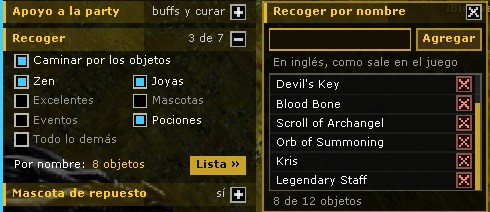
There are 7 checkboxes. The first time, all of them come checked except potions and "everything else". The space bar keeps picking up as always, separately from the Helper.
- Zen.
- Jewels: Bless, Soul, Life, Chaos, Creation and Loch's Feather.
- Excellent: excellent weapons, armor, rings and pendants.
- Pets: Guardian Angel, Imp, Uniria and Dinorant.
- Events: boxes (Kundun, Luck, Heaven, medals), Heart, Rena and the Devil Square and Blood Castle tickets.
- Potions: apples, healing, mana and antidote.
- Everything else: regular weapons and armor, orbs, books, regular rings and pendants.
To pick up only orbs or rings without checking "everything else", add orb, or ring and pendant, to your "By name" list.
By name: press the List button and a panel opens next to the window. Type the item and press Add (or Enter). Each one goes on its own line with an X to remove it, up to 12 items; with more than 6, scroll the list with the mouse wheel. It picks up everything that has that in its name, even if its checkbox isn't checked, and that comes first. The names are the in-game ones, in English.
| You type | It picks up |
|---|---|
jewel | All jewels: Bless, Soul, Life, Chaos and Creation |
bless, soul | Only Jewel of Bless and Jewel of Soul |
kundun | Kundun boxes (+1 to +5) |
box | All boxes: Box of Luck, Box of Heaven and the Kundun ones |
chaos | The Jewel of Chaos and also Chaos weapons (it matches part of the name) |
ring, pendant | Rings and pendants |
apple | Apples, even if "potions" is unchecked |
Enter saves, Esc undoes and clicking outside the field also saves. While you type, keys don't reach the game (C doesn't open the character window). It fits 63 letters and up to 8 words.
Spare pet
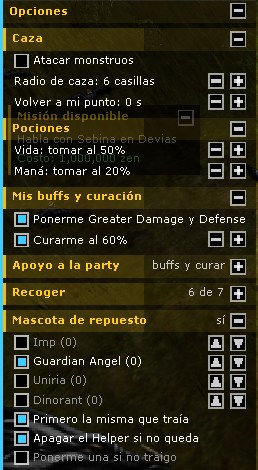
Your pet loses life from the hits you take and, when it reaches 0, it disappears (it can't be repaired). With the Helper on, at that moment it equips another one from your inventory, as if you dragged it yourself.
- Same one I had first: if an Imp broke, it equips another Imp. Checked the first time.
- Which ones and in what order (VIP): check the pets it can use and sort them with the arrows. It searches from top to bottom. The number in parentheses is how many you have in your inventory.
- Turn Helper off if none left (VIP): if you have none left of the ones you chose, the Helper turns off. If you don't check it, it keeps hunting without a pet and lets you know.
- Equip one if I have none (VIP): if you start hunting without a pet, or the Helper picks one up from the ground, it equips one from your inventory. It uses your list and your order; if you didn't check any, or don't have that option, the first one you have (Guardian Angel, Imp, Uniria, Dinorant). Checked by default.
- Of each type, it equips the one with the most life.
- It respects maps: in Atlans you can't use the Uniria or the Dinorant, and in Icarus you can't use the Uniria. If you're in Icarus without wings, only another Dinorant works.
| You want | Check |
|---|---|
| Only Imps | Imp and "same one first" |
| Only angels (wizard or elf) | Guardian Angel, "same one first" and "turn off if none left" |
| Dinorant first, then Imps and angels last | Dinorant, Imp and Guardian Angel in that order, without "same one first" |
How much it costs
It's charged in advance every 5 minutes: your level times the rate. After 2 hours of use in a day it costs ×1.5 and after 5 hours, ×2. It resets at midnight. The price is the same for everyone, with or without VIP.
| Level | Every 5 min | Per hour |
|---|---|---|
| 100 | 5,000 | 60,000 |
| 200 | 10,000 | 120,000 |
| 300 | 15,000 | 180,000 |
| 350 | 17,500 | 210,000 |
What's for everyone and what's VIP
| Option | Who can use it |
|---|---|
| Hunt around its spot with your skill | Everyone |
| HP potion at the % you choose | Everyone |
| Pick up | Everyone |
| Walk to items | Everyone |
| Spare pet | Everyone |
| Spare pet: equip one if none | VIP only |
| Mana: drink at the % you choose | VIP only |
| Repair gear | Everyone |
| Hunt range up to 10 | Everyone |
| Back to my spot (seconds) | Everyone |
| My buffs | Everyone |
| Party support (Elf and wizard) | Everyone |
| Support range up to 10 (Elf and wizard) | Everyone |
| Pick up by name | Everyone |
| Spare pet: which ones and in what order | VIP only |
| Session | VIP only |
VIP is about convenience, not power: it doesn't hit harder or give more experience, zen or drops. You can also earn VIP by voting.
Questions
- Does it keep hunting with the game closed? No: only while your game is open and you're on the map.
- Does it attack other players? No, only monsters.
- Does it use commands? You don't need any: everything is done with F8 and the window.
- What about autoclick (F9)? It's still there for active play, but it turns off by itself if you go 10 minutes without touching the mouse or keyboard, and it doesn't turn on while the Helper is on. For hunting on its own, there's the Helper.
- What if I get attacked while it's on? It drinks potions at the percentage you chose; if you die, it turns off.